

Assetto Corsa, a beloved racing simulator, offers a vast modding community that enhances the game experience exponentially. While Content Manager is a popular tool for managing mods, it’s not strictly necessary. This guide will walk you through manually installing Assetto Corsa mods.
Install Assetto Corsa Mods: Understanding the Basics
Before diving into the installation process, let’s clarify a few essential points:
- Mod Types: Assetto Corsa primarily supports car, track, and app mods.
- Mod Formats: Most mods come as compressed files (ZIP, RAR, 7z).
- Installation Directory: Mods are typically installed within the Assetto Corsa content folder.
- Manual Installation: This method requires more user intervention compared to using Content Manager.
Install Assetto Corsa Mods: Locating Your Assetto Corsa Content Folder
The first step is to identify the correct installation directory.
- Steam Library: If you purchased Assetto Corsa through Steam, right-click the game in your library, select “Properties,” then “Local Files” and “Browse.”
- Other Platforms: For other platforms, refer to the game’s installation instructions.
Once you’ve accessed the game’s folder, navigate to the “content” directory where your mods will reside. This is essential when you want to install Assetto Corsa mods and enhance your gaming experience with custom content.
Install Assetto Corsa Mods: Understanding Mod Structure
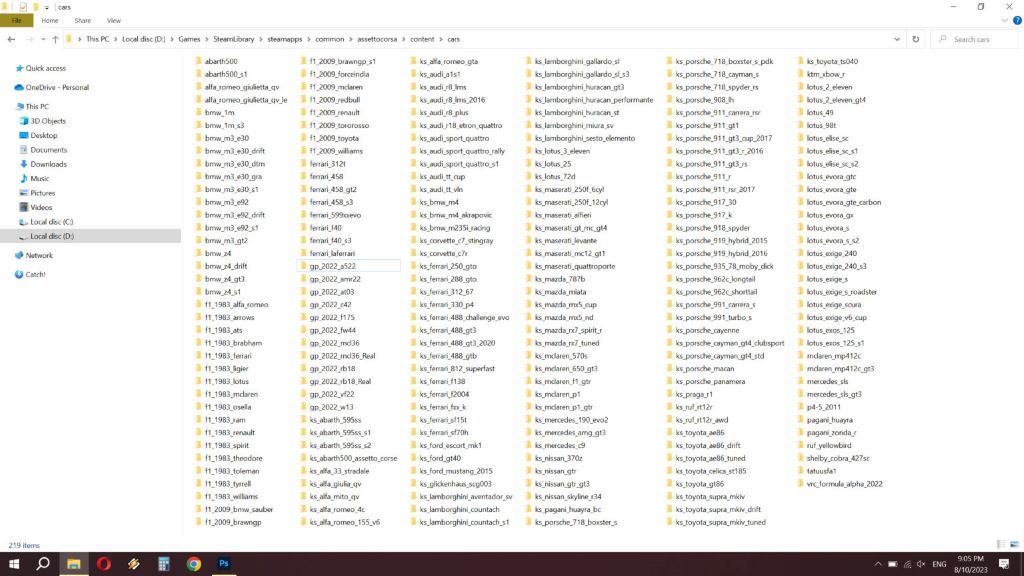
Most mods follow a specific structure:
- Cars: Typically placed in the “cars” subfolder within the content directory.
- Tracks: Usually go into the “tracks” subfolder.
- Apps: These often require more specific placement, and instructions are usually included in the mod file.
The Manual Installation Process
- Download the Mod: Obtain the desired mod from a reputable source.
- Extract the Files: Use a file compression tool to extract the mod’s contents.
- Create Necessary Folders: If the mod requires new folders, create them within the appropriate subfolder (e.g., “cars/new_car_brand”).
- Copy Files: Transfer the extracted files to their respective locations within the Assetto Corsa content folder.
- Overwrite or Merge: Some mods might require overwriting existing files. Proceed with caution and create backups if necessary.
- Additional Steps: Certain mods may include specific installation instructions. Follow these carefully.
Troubleshooting Common Issues
- Missing Dependencies: Some mods rely on other mods or specific game versions. Ensure all required components are installed.
- Conflicting Mods: Incompatible mods can cause issues. Try disabling other mods to isolate the problem.
- Incorrect File Placement: Double-check the mod’s installation instructions and file locations.
- Game Crashes: Verify the mod’s compatibility and try reinstalling or verifying game files.
Tips for a Smooth Experience
- Back-Up Your Content Folder: Create a backup before installing new mods to prevent data loss.
- Organize Your Mods: Use subfolders to keep your content organized.
- Read Mod Descriptions: Pay attention to installation instructions and compatibility information.
- Join the Community: Online forums and communities can provide valuable assistance and troubleshooting tips.
Going Beyond the Basics
For users with more advanced modding knowledge:
- Custom Shader Patch (CSP): This app enhances graphics and requires manual installation.
- Sol: A weather system mod that often demands manual configuration.
- Physics Mods: These can modify car behavior and might need specific adjustments.
Related: Which Android Phone is Right for You? A Comprehensive Guide to Navigating the Options
Conclusion
While Content Manager simplifies the mod installation process, manually installing mods offers a deeper understanding of Assetto Corsa’s file structure. By following these steps and paying attention to details, you can successfully expand your gaming experience without relying on third-party tools. Remember to explore the modding community for support, tips, and new mods to enhance your Assetto Corsa journey.
Disclaimer: Modifying game files can potentially cause issues. Always proceed with caution and create backups.


